
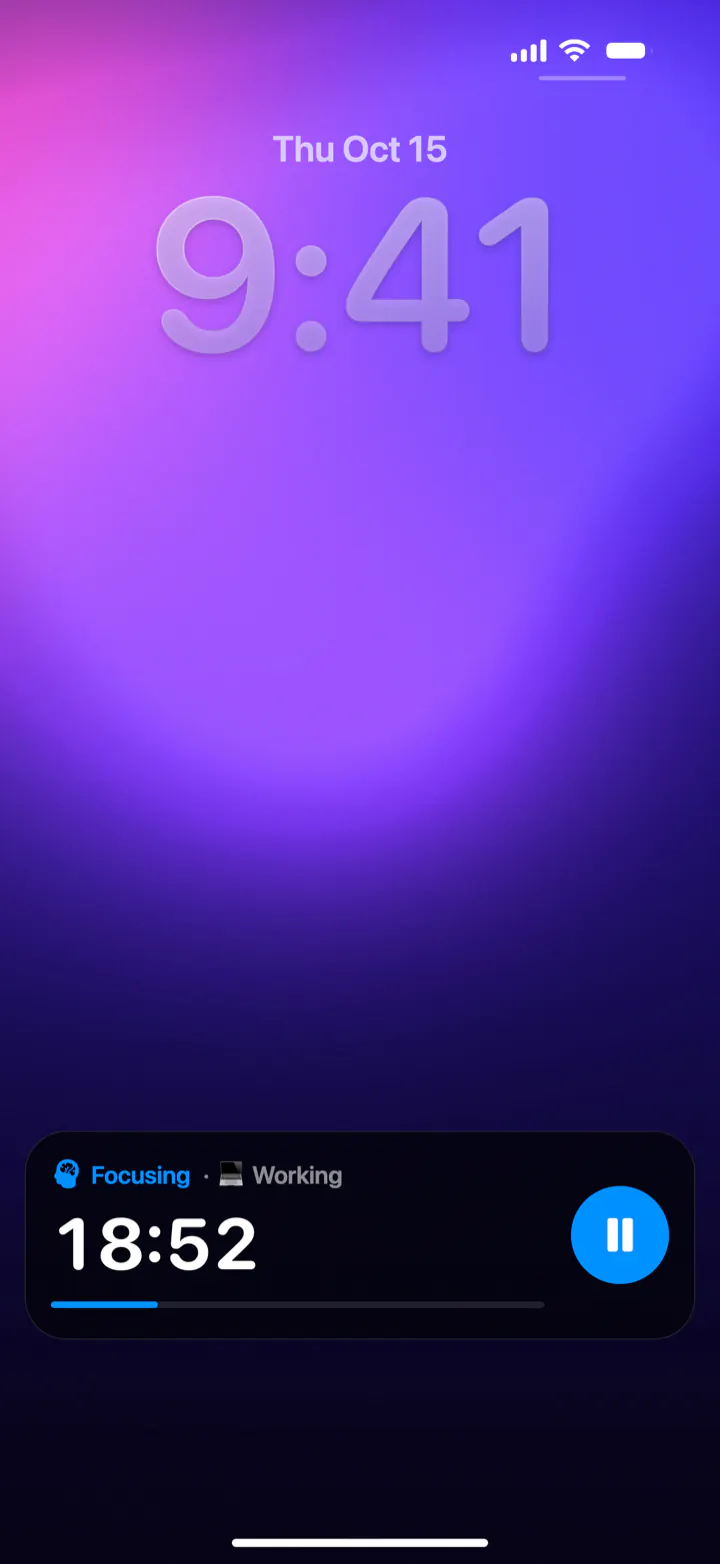
A Live Activity is a live, updating card on the iPhone Lock Screen and in the Dynamic Island. In Pomodoro Focus, start a focus session and lock your phone: the stage, the time left, a progress bar and a pause button stay on the Lock Screen until the session ends. On iPhones with a Dynamic Island, a compact timer also sits at the top of the screen while you use other apps.
What is a Live Activity?
Live Activities arrived with iOS 16. They show something that's happening right now, like a food delivery, a game score or a timer, and keep it up to date in real time. They appear on the Lock Screen, and on iPhones with a Dynamic Island they also shrink into the pill-shaped area at the top of the screen while you use other apps. When your iPhone is charging on its side in StandBy, iOS can show them large on screen too.
For focus, this is ideal: you can see how much time is left without unlocking your phone, which is exactly the moment distractions sneak in.
What you see in Pomodoro Focus
- On the Lock Screen: the stage (Focusing, Short Break or Long Break) in its color, your category, the time left counting down, a progress bar and a pause button.
- When a stage ends: “Tap to start” and a button to start your break or the next focus, right on the Lock Screen.
- In the Dynamic Island: the stage icon on the left and the time on the right, in the stage's color. Touch and hold it to expand it, with a bigger timer and the pause button.
How to use it
- Start a focus session in Pomodoro Focus.
- Lock your phone, or go back to the Home Screen.
- Glance at the Lock Screen or the Dynamic Island whenever you want to know the time left.
- If someone interrupts you, tap pause on the Lock Screen and resume when you're back.
- When the focus ends, start your break with one tap, without opening the app.
Turning Live Activities on
Live Activities are on by default. If you've turned them off, open the iPhone Settings app, scroll down to Apps, tap Focus Timer (the app's name on your Home Screen) and turn on Live Activities. The next session you start will show up on the Lock Screen.
If the timer doesn't show
- Check the setting: Settings › Apps › Focus Timer › Live Activities should be on.
- Start a session: the Live Activity appears when a focus or a break is running, not before.
- Look at the bottom of the Lock Screen: Live Activities sit above your notifications.
- Restart your iPhone if Live Activities seem stuck for every app.
- Very long sessions: iOS ends any Live Activity after 8 hours, which only matters for long No breaks sessions.
Battery: a Live Activity uses very little power. iOS draws the countdown itself from the end time, so the app doesn't have to keep running in the background to update it.
Live Activity, widget or notification?
| Live Activity | Lock Screen widget | Notification | |
|---|---|---|---|
| Live countdown | Yes, to the second | No, updates now and then | No |
| Pause and start buttons | Yes | No | Opens the app |
| In the Dynamic Island | Yes | No | No |
| Tells you when time's up | Shows it | No | Yes, with a sound |
Pomodoro Focus uses a Live Activity for the countdown and a notification for the moment a focus or a break ends, so you get both.
Questions
How do I put a timer on my iPhone Lock Screen?
Use an app with a Live Activity, like Pomodoro Focus, or the Clock app's timer. Start the timer and lock your phone: the countdown stays on the Lock Screen.
Why isn't my Live Activity showing?
Check that Live Activities are on for the app in the Settings app, and that a session is actually running. If it still doesn't appear, restart your iPhone.
Can I pause the timer from the Lock Screen?
Yes. The Pomodoro Focus Live Activity has a pause and resume button, and when a stage ends it lets you start the next one with one tap.
Does a Live Activity drain the battery?
Barely. iOS draws the countdown itself, so the app doesn't need to run in the background to keep it up to date.
How long can a Live Activity stay on?
Up to 8 hours. iOS then ends it automatically, which only matters for very long No breaks sessions.